
In this article
- 🔥 DEPARTURE SCENARIO
- 1. 🧭 RETURNING TO NORMAL
- 2. 📝 HOLD AN INITIAL DEBRIEF
- 3. 📸 DOCUMENT THE DAMAGE
- 4. 🛡 START YOUR INSURANCE CLAIM
- 5. 💬 LOOK AFTER YOUR MENTAL HEALTH
- 6. - CLEANING AND REPAIRS
- 7. 📅 PLAN FOLLOW-UP ACTIONS
- 8. 🗃 ADMINISTRATIVE STEPS
- 9. 💡 A FINAL TIP
- 📚 OFFICIAL RESOURCES
- Optional equipment examples
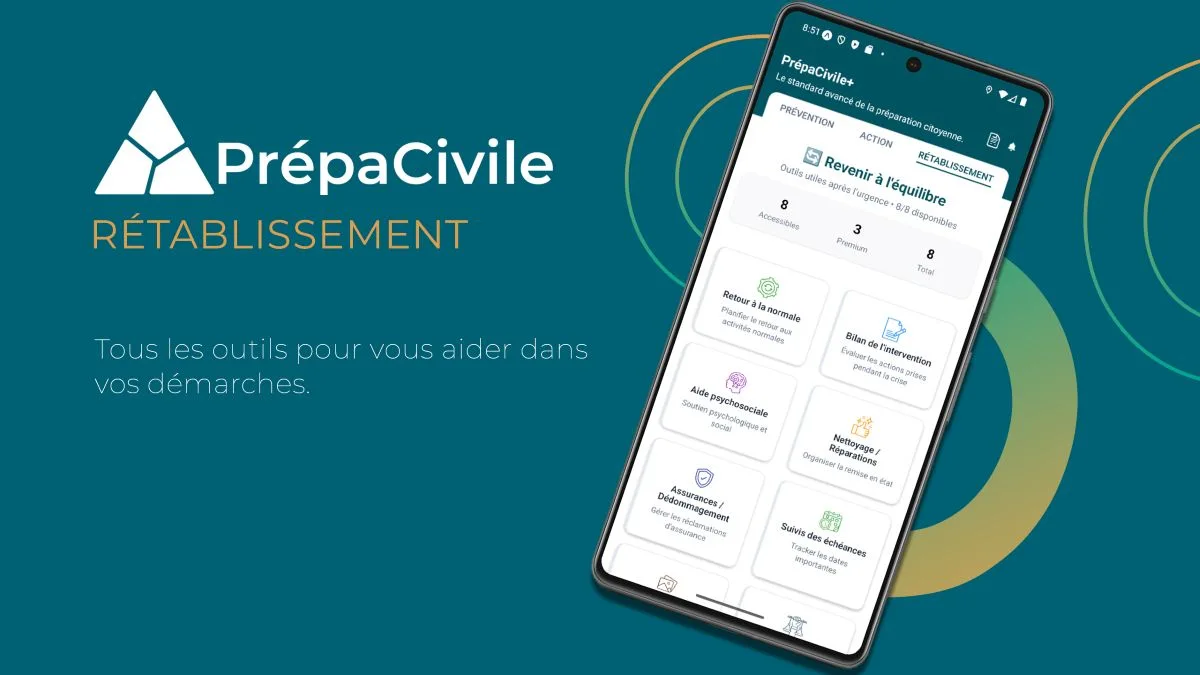
PrépaCivile+ - For those who need to rebuild after being hit.
🔥 DEPARTURE SCENARIO
April 21 at 3:42 a.m., A brutal flood hits your neighborhood of Saint-Jérôme. You had to evacuate urgently with your family. You are now back in a partially damaged house: humidity, odors, electricity cut, material losses, stress, steps, fatigue.
And now... what do we start with?
1. 🧭 RETURNING TO NORMAL
Tile: Back to normal
Open the “Back to normal” tile. The application guides you according to the type of disaster experienced (flooding here).
✅ Check the essential actions :
-
Check the structure of the building
-
Turn off the power as needed
-
Inform the municipality of your return
-
Quickly assess unsafe areas
🔧 You can add your own actions.
📄 Export this checklist to share with your loved ones or the owner if you are a tenant.
2. 📝 HOLD AN INITIAL DEBRIEF
Tile: Assessment of the intervention
Take 15 minutes to Back to what happened :
-
How did you react?
-
What obstacles have you encountered?
-
What decisions have been useful or not?
🧠 Write down what you have learned.
This will help to improve your family plan.
You can export it as a PDF to print it, show it to a speaker or keep it.
3. 📸 DOCUMENT THE DAMAGE
Tile: Gallery of Damage
Before you clean or touch anything :
📷 Take photos with date/time (integrated function).
📝 Add a description: part, type of damage, etc.
📁 Examples :
-
Visible molds in the bathroom
-
Water up to 40 cm in the basement
-
Furniture soaked
📦 Export an ZIP or PDF to transmit to the insurance.
4. 🛡 START YOUR INSURANCE CLAIM
Tile: Insurance & Compensation
Go to the section Habitation : A checklist will guide you step by step :
-
Open Folder
-
Gathering the evidence
-
Contact the claims adjuster
-
Note the exclusions of your contract
Add your insurer, the responsible agent, his contact information. You can also add your own tasks.
5. 💬 LOOK AFTER YOUR MENTAL HEALTH
Tile: Psychosocial assistance
Even if “it’s okay,” do it. PCL - 5 (scientifically validated). You will get a Immediate interpretation :
-
No clinical symptoms
-
Moderate symptoms
-
High score : Consult Info-Social at 811, option 2
You can Save the assessment in the history or export it as a PDF.
6. - CLEANING AND REPAIRS
Tile: Cleaning / Repairs
Choose Flooding as a type of disaster.
The checklist offers you :
-
Securing the areas
-
Remove wet materials
-
Clean with suitable products
-
Contacting Entrepreneurs
-
Obtaining a health certificate
💡 You can add custom tasks like “call François for the submersible pump”.
7. 📅 PLAN FOLLOW-UP ACTIONS
Tile: Follow-up / Deadlines
In the following days/weeks, you will need :
-
Follow the status of compensation
-
Schedule an appointment at the hospital
-
Check the school resumption of children
-
Hydro - Quebec
Create events with Automatic Notification, and add them to your local calendar.
8. 🗃 ADMINISTRATIVE STEPS
Tile: Administrative procedures
Consult the models provided (e.g., notice to employer, owner or insurance).
You will also find a section on financial aid :
💰 Programmes available :
-
Financial assistance in the event of a real or imminent disaster (PAFIRS))
-
Municipal compensation
-
Temporary relocation assistance
Add your own steps and follow their status (to do / in progress / finished).
9. 💡 A FINAL TIP
Reopen your tile Back to normal.
You have advanced in all spheres? Progression is visible.
➡️ Download all generated PDFs.
➡️ Evaluate if you need to improve your preparation for the next time.
📚 OFFICIAL RESOURCES
-
Government of Quebec : https://www.quebec.ca/securite-situations-urgence
-
Canadian Red Cross : https://www.croixrouge.ca
-
Info-Social : Call him 811, Option 2
-
Ministry of Public Security - Financial assistance after a disaster : https://www.quebec.ca/securite-situations-urgence/aide-financiere
Two items for putting these ideas into practice
Plan lighting and ordinary handling tasks after return is authorized, without entering a dangerous area.
Affiliate links: as an Amazon Associate, PrépaCivile earns from qualifying purchases. These examples are optional. Check the model, package contents and terms. Use equipment you already own first.
Gloves for ordinary handling tasks
Choose the right size. These gloves do not protect against chemicals, bites, electricity or fire.
Canada — Amazon.ca
 Mechanix Wear - Gants FastFit Covert tactiques pour écran tactileView on Amazon.ca
 Mechanix Wear - FastFit Covert Touch Screen Gants (Medium, Noir)
Headlamp for hands-free lighting
Check required batteries and storage; supervise children using the light.
Canada — Amazon.ca
 BLACK DIAMOND Spot 400 Lampe frontale | Luminosité de 400 lumens | Intensité variable | Étanche et durable | Fonctionne avec 3 piles AAA (incluses) | GraphiteView on Amazon.ca
 Black Diamond Unisex Spot 400 Lampe Frontale Graphites One Size